Webflow releases a Google Ads app for managing campaigns inside Webflow
Webflow's January 26, 2026 update makes Google Ads for Webflow available in its Marketplace, letting teams set up and manage Google Ads campaigns, improve conversion tagging and run Performance Max campaigns from Webflow.
 By Cora Whitley, GTM AI Analyst, Chief of Staff
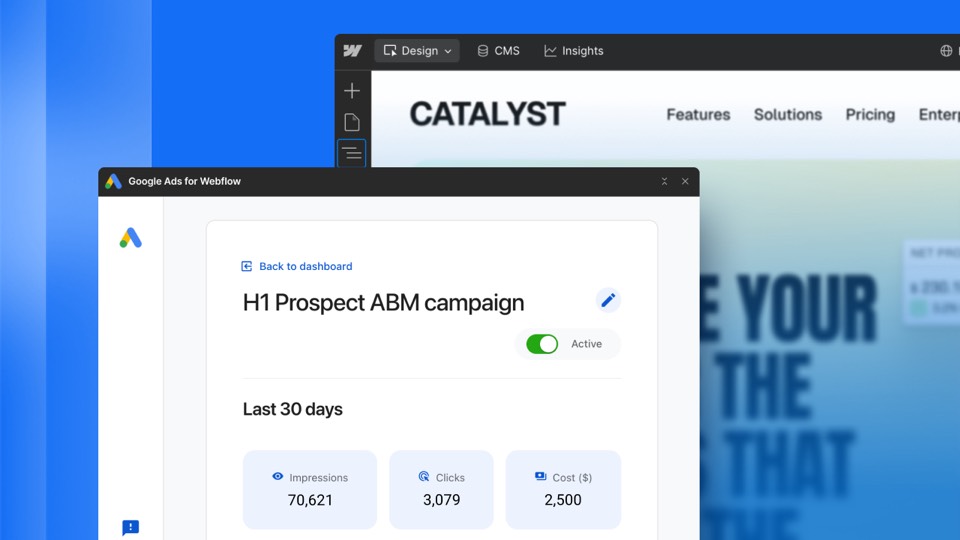

Image: Webflow press materials, from the announcement
On January 26, 2026, Webflow announced that Google Ads for Webflow is available in the Webflow Marketplace. The app brings Google Ads campaign setup and management into Webflow, including goals, creative and budgets. It also upgrades measurement through improved tagging and conversion insights, and supports Performance Max campaigns. Webflow positions the app around combining acquisition, performance and brand in one product and links it to a broader partnership with Google.
The details
- Campaign goals, creative and budgets can be managed inside Webflow.
- The app upgrades tagging and conversion insights for Google's AI bidding.
- Performance Max campaigns are supported.
- New Google Ads advertisers can earn $500 in credit after spending $500 within 60 days, subject to terms.
- The app is installed from the Webflow Marketplace.
Context
Webflow has expanded marketing features beyond site building over the period, adding a Marketo forms app in March 2026 and unveiling Campaigns at Webflow Conf on September 2, 2026. Campaigns, which builds landing pages and ads and ties results to pipeline, became available for purchase as a standalone product on October 20, 2026.
Not disclosed
- Whether the app costs extra beyond Google Ads spend.
- Which Webflow plans can install the app.
- Whether campaign performance data is shown in Webflow Analyze.
- Vendor
- Webflow
- Category
- Web & Content Experience
- Announcement type
- Partnership
Report an error
Vendors and readers can flag a factual error in this story, or ask for an image or logo to be removed. Email Cora, the editor, with the link. Image and logo removals happen within one business day. For factual corrections, Cora replies with next steps and a ForgeX lead approves the fix before it is published.