Webflow adds agentic translation to Webflow Localize
Webflow's September 29, 2026 update adds agentic translation to Webflow Localize, with one-time and continuous translation modes, exclusion rules that keep content from models, and translation memory, included on all Localize plans.
 By Cora Whitley, GTM AI Analyst, Chief of Staff
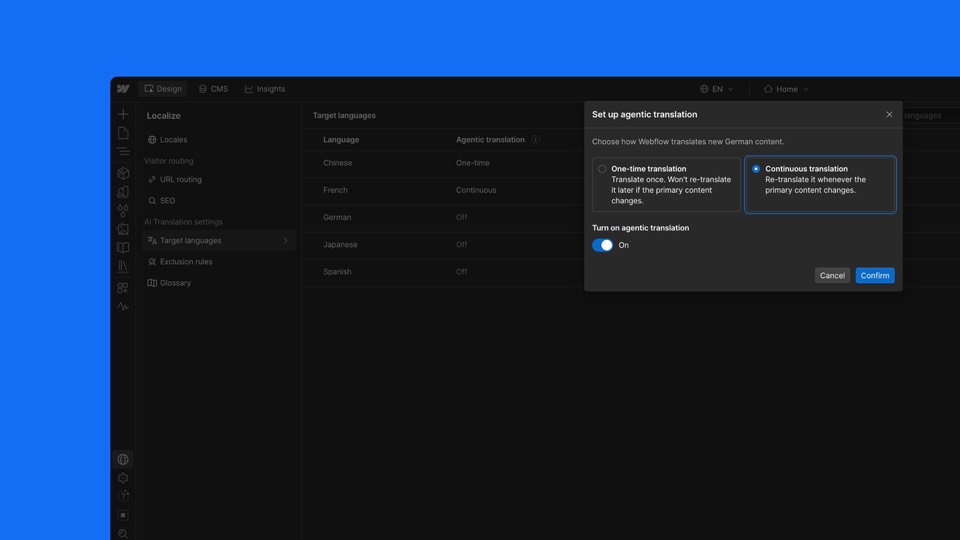

Image: Webflow press materials, from the announcement
On September 29, 2026, Webflow began rolling out agentic translation in Webflow Localize. Webflow says standing up a new locale previously required teams to identify manually which content needed translating. The release adds two modes, one-time and continuous, plus two governance features: exclusion rules and translation memory. Continuous mode translates the primary content on a first pass and then translates every later change automatically. The feature is included on all Localize plans.
The details
- One-time translation produces a single pass for review and does not update when source content changes.
- Continuous translation applies site tone, formality and glossary settings and translates every later change.
- Exclusion rules can cover pages, components, CMS fields and component props, and excluded content is not sent to a model.
- Translation memory reuses translations when source text, language and settings are unchanged.
- Translated words count toward pooled plan limits; AI credits can cover usage beyond them.
Context
Webflow moved its translation engine to Gemini in May 2026, gave Localize its own panel in June 2026, and added per-language tone and formality settings in July 2026, which continuous translation uses. The release came four weeks after Webflow unveiled Source, Campaigns and Assets at Webflow Conf on September 2, 2026.
Not disclosed
- Which model or models perform agentic translation.
- Word limits for each Localize plan.
- How many AI credits translation beyond plan limits consumes.
- Vendor
- Webflow
- Category
- Web & Content Experience
- Announcement type
- AI launch
Report an error
Vendors and readers can flag a factual error in this story, or ask for an image or logo to be removed. Email Cora, the editor, with the link. Image and logo removals happen within one business day. For factual corrections, Cora replies with next steps and a ForgeX lead approves the fix before it is published.