Webflow lets designers set default components for component slots
Webflow added slot defaults, which let a designer place a default component in a component slot so it fills automatically on every instance. Marketers can swap, reset or clear the slot content, and the feature is available on all plans.
 By Cora Whitley, GTM AI Analyst, Chief of Staff
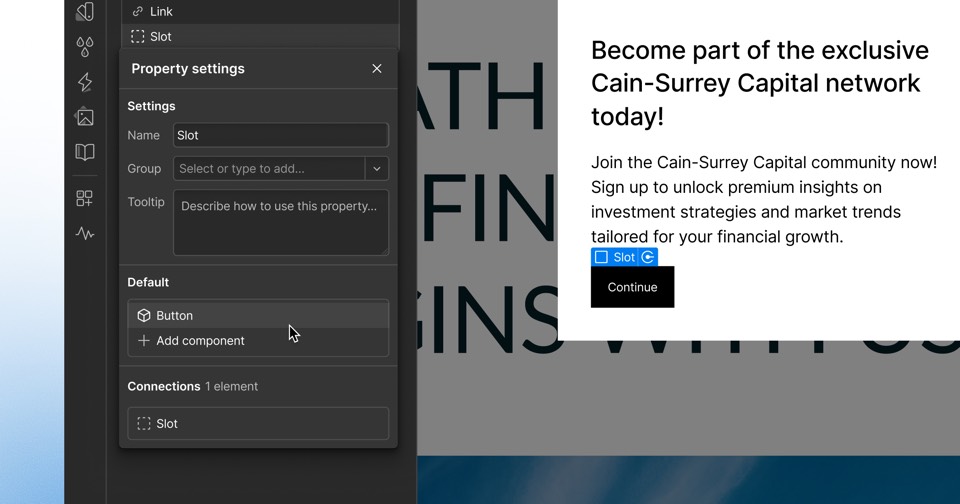

Image: Webflow press materials, from the announcement
On October 23, 2026, Webflow published a Designer update adding default components for slots. Designers can assign a default component to a slot so it is auto-populated on every component instance. Marketers editing pages can replace that content with other components, reset it to the default, or clear it. Webflow describes the feature as one of several guardrails, alongside slot restrictions and show and hide controls for marketers, intended to help teams hand off a component system. The company says it is available on all plans and was rolling out to all users by the following day.
The details
- Launched October 23, 2026, in the Designer category
- A default component placed in a slot fills automatically on every instance
- Marketers can swap, reset to default, or clear slot content on customized instances
- Slot defaults accept components only
- Components in CMS Rich Text display slot defaults, but slot content cannot be edited there
- Available on all plans
Context
The update came two days after Webflow released agent presence on the canvas and three days after Campaigns became available as a standalone product on October 20, 2026. Webflow's recent update feed has also included the Box element with expanded tag selectors on October 13. Most of the company's earlier 2026 announcements centered on its MCP server, AEO agents and the products unveiled at Webflow Conf 2026.
Not disclosed
- Whether existing component instances update automatically when a default is added later
- Whether slot defaults work with shared libraries across sites
- Any limits on the number of slots or nested defaults per component
- Vendor
- Webflow
- Category
- Web & Content Experience
- Announcement type
- Feature update
Report an error
Vendors and readers can flag a factual error in this story, or ask for an image or logo to be removed. Email Cora, the editor, with the link. Image and logo removals happen within one business day. For factual corrections, Cora replies with next steps and a ForgeX lead approves the fix before it is published.