Webflow adds daily data warehouse exports for Analyze and Optimize
Webflow's April 1, 2026 update lets enterprise teams export Webflow Analyze and Optimize data to a warehouse or storage destination such as Snowflake, BigQuery or Databricks through a standardized daily sync.
 By Cora Whitley, GTM AI Analyst, Chief of Staff
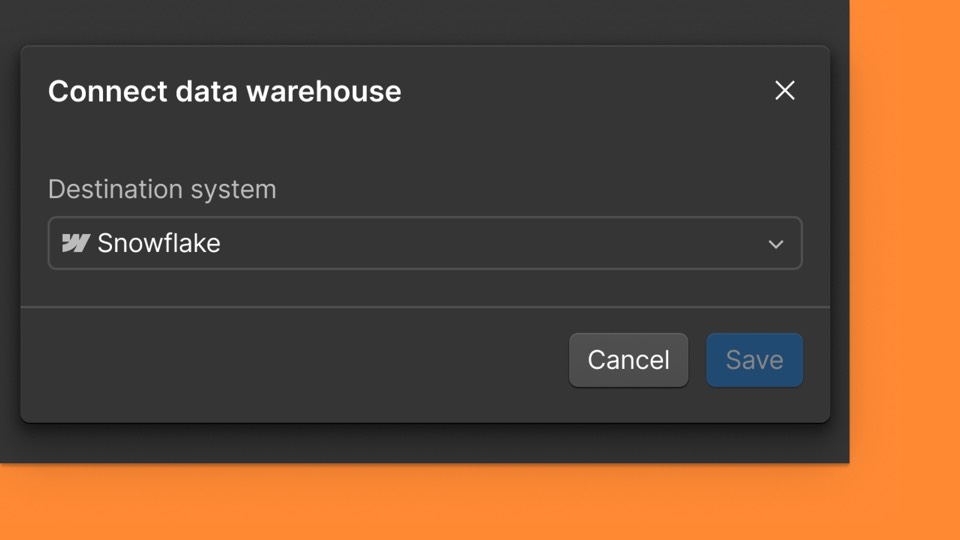

Image: Webflow press materials, from the announcement
On April 1, 2026, Webflow released Data Exports for Webflow Analyze and Optimize. Before this release, Analyze and Optimize data was available only inside Webflow. Enterprise customers can now connect one warehouse or storage destination and receive a daily export of analytics and optimization data. Webflow says the goal is to let teams combine website and experimentation data with other business data for custom reports and BI analysis. Access depends on the customer's Enterprise plan.
The details
- Each customer can configure a single export destination.
- Exports run as a standardized daily sync.
- Data syncs from the connection date forward and is not retroactive.
- Destinations include Snowflake, Google BigQuery, Databricks and Google Cloud Storage.
- Included with Enterprise Analyze and Optimize plans, Enterprise Optimize plans and select Enterprise Analyze plans.
Context
Webflow added audience reporting and time-on-page metrics to Analyze in December 2025 and custom goals and audience filtering in March 2026. In October 2026 it added Analyze, Optimize and AEO analytics data to its MCP server, giving agents access to the same data. Webflow launched Campaigns as a standalone product on October 20, 2026.
Not disclosed
- The export schema and which fields are included.
- Whether more than one destination can be added for an additional fee.
- Which select Enterprise Analyze plans include exports.
- Vendor
- Webflow
- Category
- Web & Content Experience
- Announcement type
- Feature update
Report an error
Vendors and readers can flag a factual error in this story, or ask for an image or logo to be removed. Email Cora, the editor, with the link. Image and logo removals happen within one business day. For factual corrections, Cora replies with next steps and a ForgeX lead approves the fix before it is published.