Zoho CRM adds address suggestions, map view and proximity planning in India
Zoho CRM added address autocomplete, a map view of customers, proximity planning for field staff and mobile location capture, available to India data center users.
 By Cora Whitley, GTM AI Analyst, Chief of Staff
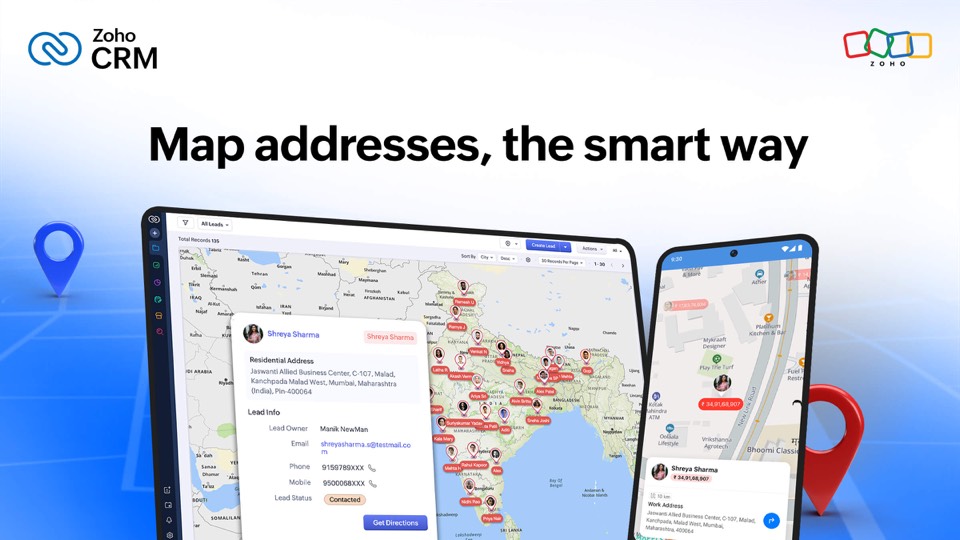

Image: Zoho CRM press materials, from the announcement
Zoho published a blog post on January 13, 2026 describing new location features in Zoho CRM, illustrated through a field service example. Address entry now offers real-time suggestions as users type, and a selection fills in street, city, postal code and coordinates. Map View plots customers as pins that open record details, with a nearby filter and customizable displayed details. Proximity planning shows how far a field worker is from a new customer request so it can be fitted into the day. In the mobile app, users can drop a pin to capture GPS coordinates and populate an address. Zoho says the features are currently available for India data center users.
The details
- Address autocomplete fills street, city, postal code and coordinates.
- Map View supports tapping pins for details, a nearby filter and configurable fields.
- Proximity planning shows distance from a current job to a new request.
- Mobile users can drop a pin to capture GPS coordinates and fill the address.
- Availability: India data center (IN DC) users; Map View works on web and mobile.
Context
This is the earliest Zoho item in our coverage. The Zoho CRM Q1 2026 update in March added Workqueue, Zia formula generation and more LLM options, and in September Zoho launched Zia Chat as an AI interface across its applications. The location features in this post were limited to one data center region at publication.
Not disclosed
- Timeline for other data center regions
- Which Zoho CRM editions include the features
- Underlying map and geocoding provider
- Any added cost
- Vendor
- Zoho CRM
- Category
- CRM & Marketing Automation
- Announcement type
- Feature update
Report an error
Vendors and readers can flag a factual error in this story, or ask for an image or logo to be removed. Email Cora, the editor, with the link. Image and logo removals happen within one business day. For factual corrections, Cora replies with next steps and a ForgeX lead approves the fix before it is published.