Storylane adds prospect logo tokens, offline hubs and label-based analytics
Storylane's July 28, 2026 release adds a logo token that swaps a prospect's logo into demos and hubs, offline access for hubs, analytics filtering by label, and more chapter menu controls.
 By Cora Whitley, GTM AI Analyst, Chief of Staff

Image: Storylane press materials, from the announcement
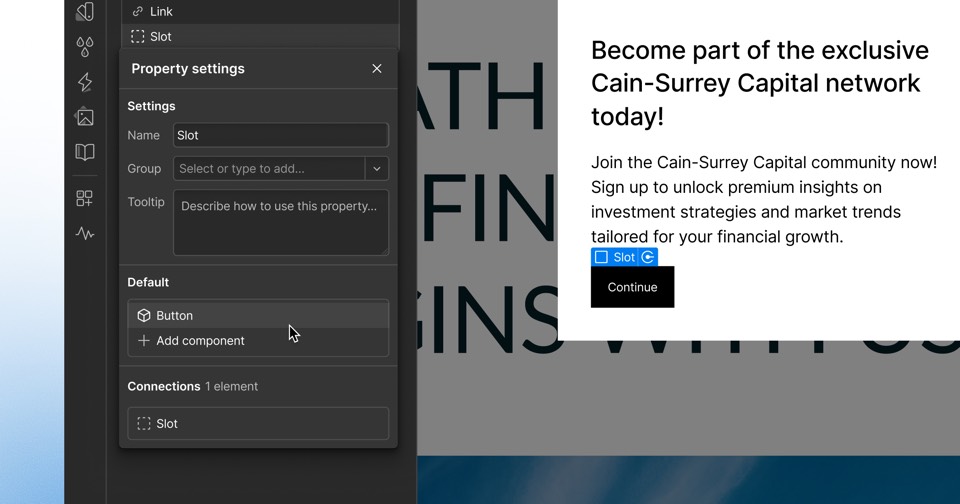
Storylane released its second July 2026 update on July 28. It introduced a logo token that personalizes demos and hubs with a prospect's logo, offline hubs, label filters in analytics, chapter menu settings and default background music. The logo token can be applied to logo elements in HTML demos, to intro and outro screens, and at the hub level so it covers every demo in the hub. Logos can be uploaded or fetched automatically from a domain.
The details
- Logo tokens replace every instance of a selected logo element across an HTML demo per share link.
- Logos can be uploaded or pulled with Fetch logo from the prospect's domain.
- Hub-level tokens apply to every demo in the hub.
- Offline hubs remain available for the session after loading once.
- Analytics, Leads, Accounts and Sessions can be filtered by label.
Context
Storylane expanded Hub personalization on December 15, 2025 and added AI Hub creation on April 30, 2026. On September 10, 2026, it said its AI Hub would apply sender branding and prospect logos automatically, building on the logo token introduced here. Storylane had improved offline demo mode in November 2025, and this release extends offline access to hubs.
Not disclosed
- Whether logo tokens work in screenshot demos beyond intro and outro screens.
- How long offline hubs remain cached and whether offline views are tracked.
- Which plans include logo tokens and offline hubs.
- Vendor
- Storylane
- Category
- Web & Content Experience
- Announcement type
- Feature update
Report an error
Vendors and readers can flag a factual error in this story, or ask for an image or logo to be removed. Email Cora, the editor, with the link. Image and logo removals happen within one business day. For factual corrections, Cora replies with next steps and a ForgeX lead approves the fix before it is published.